
Do digital door locks need wifi?

As smart home technology becomes more popular, many Americans are considering upgrading to digital door locks (also called smart locks or electronic locks). One of the most common questions people have is:
Do digital door locks need Wi-Fi to work?
The short answer is: No, not all digital locks require Wi-Fi. However, some features—like remote access—do need an internet connection.
This guide will explain:
How different digital locks function (with and without Wi-Fi)
Pros and cons of Wi-Fi vs. non-Wi-Fi locks
Which type is best for your home security needs
How Digital Door Locks Work (With & Without Wi-Fi)
Digital door locks use electronic mechanisms instead of traditional keys. They can be controlled via:
-
PIN codes
-
Fingerprint scanners
-
Smartphone apps (Bluetooth or Wi-Fi)
-
RFID cards/key fobs
-
Voice assistants (if connected to Wi-Fi)
1. Digital Locks That DON’T Need Wi-Fi
These locks work locally without an internet connection:
A. Bluetooth-Enabled Smart Locks
-
How they work: Use Bluetooth to connect to your phone within a short range (~30 feet).
-
No Wi-Fi needed? Yes, they work offline.
-
Best for: People who want keyless entry but don’t need remote access.
B. Keypad & Fingerprint Locks (Standalone Models)
-
How they work: Unlock via PIN codes or biometric scans (no phone required).
-
No Wi-Fi needed? Yes, fully offline.
-
Best for: Renters, Airbnb hosts, or anyone who wants basic keyless entry.
C. RFID/NFC Card Locks
-
How they work: Unlock by tapping a keycard or fob (like hotel door locks).
-
No Wi-Fi needed? Yes, no internet required.
-
Best for: Offices, vacation rentals, or families with kids.
2. Digital Locks That DO Need Wi-Fi (For Full Features)
These locks require Wi-Fi (or a hub) for advanced functions:
A. Wi-Fi-Connected Smart Locks
-
How they work: Connect directly to your home Wi-Fi for remote access.
-
Wi-Fi needed? Yes, for remote control.
-
Best for: Homeowners who want to lock/unlock doors from anywhere.
B. Smart Locks with a Hub (Zigbee/Z-Wave)
-
How they work: Use a smart home hub to enable remote features.
-
Wi-Fi needed? No, but the hub must connect to Wi-Fi for internet access.
-
Best for: Smart home users who already have a hub.
Pros & Cons: Wi-Fi vs. Non-Wi-Fi Digital Locks
| Feature | Wi-Fi Locks | Non-Wi-Fi Locks |
|---|---|---|
| Remote Access | Yes (via app) | No (local only) |
| Smart Home Integration | Works with Alexa/Google Home | Limited (unless Bluetooth) |
| Security Risks | Vulnerable to hacking (if poorly encrypted) | More secure (no internet exposure) |
| Battery Life | Drains faster (Wi-Fi uses more power) | Longer battery life |
| Internet Outage Impact | Stops remote features | Still works normally |
| Best For | Tech-savvy users, frequent travelers | Renters, basic security needs |
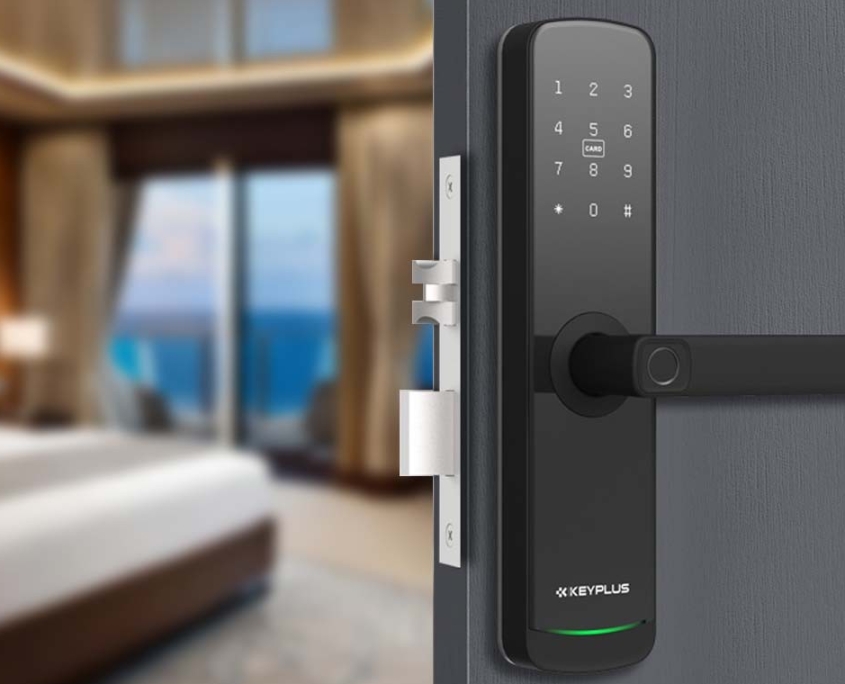
Do You Really Need a Wi-Fi Smart Lock?
Choose a Wi-Fi Lock If You Want:
Remote access (lock/unlock from anywhere)
Real-time alerts (get notifications when someone enters)
Smart home automation (e.g., “Alexa, lock the front door”)
Temporary guest access (send digital keys to visitors)
Avoid Wi-Fi & Pick a Non-Wi-Fi Lock If You:
Don’t need remote control
Want longer battery life
Prefer a simpler, more secure system
Live in an area with unreliable Wi-Fi
Alternative: Bluetooth + Wi-Fi Hybrid Locks
Some smart locks offer both Bluetooth and Wi-Fi for flexibility:
-
Use Bluetooth at home (saves battery).
-
Enable Wi-Fi when you need remote access.
-
Best of both worlds, but usually more expensive.
Security Concerns: Are Wi-Fi Locks Safe?
A common worry is: “Can hackers break into Wi-Fi locks?”
How to Keep Your Smart Lock Secure:
Choose locks with AES 128/256-bit encryption
Use a strong Wi-Fi password (WPA3 security)
Enable two-factor authentication (if available)
Regularly update firmware
Non-Wi-Fi locks are generally safer from hacking since they don’t connect to the internet.
Power & Battery Life Considerations
-
Wi-Fi locks drain batteries faster (typically 3-6 months).
-
Bluetooth/offline locks last longer (6-12 months).
-
Look for models with low-battery warnings & backup keys (in case batteries die).
Final Verdict: Which Type Should You Buy?
Best Wi-Fi Smart Lock For:
-
Homeowners who travel often
-
Families with frequent guests
-
Smart home enthusiasts
Best Non-Wi-Fi Smart Lock For:
-
Renters (no permanent installation)
-
People who prioritize battery life
-
Those who don’t need remote access
Hybrid (Bluetooth + Wi-Fi) For:
-
Users who want both convenience and flexibility
Conclusion: Wi-Fi Is Optional (But Useful)
Do digital door locks need Wi-Fi? Not necessarily. While offline locks (Bluetooth, keypad, RFID) work without internet, Wi-Fi unlocks advanced features like remote control and smart home integration.
Before Buying, Ask Yourself:
-
Do I need to lock/unlock my door remotely? → Get Wi-Fi.
-
Do I just want keyless entry? → A Bluetooth or keypad lock is enough.
-
Am I worried about hacking? → Stick to non-Wi-Fi models.
Upgrade wisely, and enjoy a safer, key-free home!
Related Blog
 https://www.keyplusystem.com/wp-content/uploads/2026/10/image-20261010-080119085.png
1024
1536
Wu, Wendy
/wp-content/uploads/2023/05/logo.png
Wu, Wendy2026-10-10 06:01:302026-10-10 06:01:31Driving Hotel Efficiency with Advanced Digital Door Locks: The Ultimate B2B Guide
https://www.keyplusystem.com/wp-content/uploads/2026/10/image-20261010-080119085.png
1024
1536
Wu, Wendy
/wp-content/uploads/2023/05/logo.png
Wu, Wendy2026-10-10 06:01:302026-10-10 06:01:31Driving Hotel Efficiency with Advanced Digital Door Locks: The Ultimate B2B Guide https://www.keyplusystem.com/wp-content/uploads/2026/10/image-20261010-000134148.png
1024
1536
Wu, Wendy
/wp-content/uploads/2023/05/logo.png
Wu, Wendy2026-10-09 22:01:442026-10-09 22:01:46Revolutionizing Hotel Security: RFID Key Cards and AIoT Smart Lock Solutions by KEYPLUS
https://www.keyplusystem.com/wp-content/uploads/2026/10/image-20261010-000134148.png
1024
1536
Wu, Wendy
/wp-content/uploads/2023/05/logo.png
Wu, Wendy2026-10-09 22:01:442026-10-09 22:01:46Revolutionizing Hotel Security: RFID Key Cards and AIoT Smart Lock Solutions by KEYPLUS https://www.keyplusystem.com/wp-content/uploads/2026/10/image-20261009-160126393.png
1024
1536
Wu, Wendy
/wp-content/uploads/2023/05/logo.png
Wu, Wendy2026-10-09 14:01:362026-10-09 14:01:38The Future of Hospitality: Wireless Hotel Lock Systems Powered by KEYPLUS
https://www.keyplusystem.com/wp-content/uploads/2026/10/image-20261009-160126393.png
1024
1536
Wu, Wendy
/wp-content/uploads/2023/05/logo.png
Wu, Wendy2026-10-09 14:01:362026-10-09 14:01:38The Future of Hospitality: Wireless Hotel Lock Systems Powered by KEYPLUS https://www.keyplusystem.com/wp-content/uploads/2026/10/image-20261009-080202455.png
1024
1536
Wu, Wendy
/wp-content/uploads/2023/05/logo.png
Wu, Wendy2026-10-09 06:02:152026-10-09 06:02:17Revolutionizing Hotel Security: The Future of Smart Locks for Hospitality Spaces
https://www.keyplusystem.com/wp-content/uploads/2026/10/image-20261009-080202455.png
1024
1536
Wu, Wendy
/wp-content/uploads/2023/05/logo.png
Wu, Wendy2026-10-09 06:02:152026-10-09 06:02:17Revolutionizing Hotel Security: The Future of Smart Locks for Hospitality Spaces https://www.keyplusystem.com/wp-content/uploads/2026/10/image-20261009-000116876.png
1024
1536
Wu, Wendy
/wp-content/uploads/2023/05/logo.png
Wu, Wendy2026-10-08 22:01:272026-10-08 22:01:29Revolutionizing Hotel Room Security: How Smart Locks Enhance Guest Safety and Operational Efficiency
https://www.keyplusystem.com/wp-content/uploads/2026/10/image-20261009-000116876.png
1024
1536
Wu, Wendy
/wp-content/uploads/2023/05/logo.png
Wu, Wendy2026-10-08 22:01:272026-10-08 22:01:29Revolutionizing Hotel Room Security: How Smart Locks Enhance Guest Safety and Operational Efficiency https://www.keyplusystem.com/wp-content/uploads/2026/10/image-20261008-080144553.png
1024
1536
Wu, Wendy
/wp-content/uploads/2023/05/logo.png
Wu, Wendy2026-10-08 06:01:552026-10-08 06:01:57Why Portable Locks are a Game-Changer for Modern Hotel Room Security
https://www.keyplusystem.com/wp-content/uploads/2026/10/image-20261008-080144553.png
1024
1536
Wu, Wendy
/wp-content/uploads/2023/05/logo.png
Wu, Wendy2026-10-08 06:01:552026-10-08 06:01:57Why Portable Locks are a Game-Changer for Modern Hotel Room Security
